
Skip to content
  • Home
  • Contact
  • Back to CyberMark
Submit a Request
  • Home
  • Contact
  • Back to CyberMark
icon
General
  • Manage CyberMark Billing Methods
  • What is a Landing Page?
  • Contacting CyberMark
  • Submitting a ticket via Email
  • Grant Access to CyberMark: Facebook, Google, TikTok & More
  • Editing Your User Profile
  • How To Utilize CyberMark’s Client Success Center & Client Portal
icon
SEO
  • Keyword Rankings
  • What’s Included in CyberMark’s SEO Program?
  • What is a Website Audit?
  • Why Isn’t My Site Showing Up in Search Results?
icon
Social Media
  • How to Set up an Instagram Page
  • How to Create a Facebook Page using Facebook Business Manager
  • What is the difference between a boosted post and an ad?
  • Facebook Business Categories | How to Set Up Your Page
  • How do I change a social media post?
  • Why was my Instagram account disabled?
  • When do Social Media Services start?
  • Is my social media program successful?
  • How do I get people to “like” my Facebook page?
  • What is a “handle”?
  • How do I change my handle?
icon
adVANTAGE
  • Franchise Advertising Onboarding Checklist
  • Managed Service Menu (Corporate DSA Support)
  • Which Advertising Channels are Supported?
  • What to Expect – Ad Performance Review Calls
  • Franchise Advertising | Frequently Asked Questions
  • Ad Optimizations – What Does CyberMark Do?
  • Lead Generation for Fitness 101
  • Lead Generation for Salons 101
  • Digital Advertising Benchmarks
  • How CyberMark Partners With Brands
  • Franchisor Guide: How to Manage Franchisee & Vendor Roles in Meta Business Manager
  • Why is my phone number not on the ads?
  • How CyberMark Uses Facebook Business Manager
  • How to Add CyberMark as a Partner to Facebook Business Manager (Manual Process)
icon
localVANTAGE
  • How to Add CyberMark to Google Business Profile
  • Digital Utilities Overview
  • How to Onboard a New Location
  • Why Is My Google Business Profile Not Showing Up?
  • Local Listing Management – Overview
  • Explainer Videos – CyberMark Digital Utilities Service
  • Google My Business Overview
  • What if I have a negative review for my business?
  • What if I have a duplicate Google My Business?
  • Why Was My Google Business Profile Suspended?
  • Tips & Tricks For Google My Business
  • How Do I Manage My Google My Business Listing?
  • What are Local Listings?
  • How Do Local Listings Help My Business?
  • Can I delete negative reviews for my business?

icon
brandVANTAGE
  • Franchise Solution Version 7 – The Learning Hub
  • How To Create A Careers Post
  • How To Create A New Special
  • How To Create A New Testimonial
  • How To Create A New Event
  • How To Create FAQS
  • How To Create Team Profiles
  • How To Create A Blog Post
Ad Platforms
  • Granting Agency Access to LinkedIn
  • Meta Audience Targeting FAQs
  • How to Manage Your Payment Method on Google Ads
  • Advertising Botox and Prescription Drugs: Policy Guidelines for Med Spa Owners
  • How to Create a Facebook Ads Account
  • Changes are Coming to How You Pay for Google Ads
  • How We Handle Google Ad Suspensions
  • Google Advertiser Identity Verification
  • How to See Active Ads
  • How to Share Your Meta Dataset (Facebook Pixel)
  • How to Create a Facebook Business Account
  • How Does the Google Ad Auction Work?
  • What is the “Learning Phase” on Meta/Facebook?
  • How Can I Get Access to My Ad Accounts?
  • Should You Bid on Your Brand Name in Paid Search (PPC) Campaigns?
  • How Can I See My Ads on Facebook?
  • FAQs: Bullseye Geotargeting
  • What to Expect When You Start Facebook Ads
  • What to Expect When You Start Google Ads
  • How to manage payment method on Facebook
  • Ad Creative Sizes and Specs
  • How iOS 14.5 Affects Your Advertising Campaigns
  • Why haven’t I received a lead in the last day?
  • Geotargeting VS Geofencing
  • How does billing on Google work?
  • Why was my image disapproved in Google?
  • How to Grant CyberMark Access to Google Ads
  • How can I see my ads on Google?
CyberMark Tools
  • How to Manually Add a Lead to the Portal
  • What is Userback?
  • How to Read the Monthly Report
  • How to Use the Reporting Dashboard
  • Reporting 101: What We Report On
  • How to Export Leads from the CyberMark Lead Portal
  • Digital Marketing Glossary
  • How to Use the CyberMark Lead Tracking Portal
  • Different Platforms Report Different Results For Same Date Range
  • How can I access the Lead Tracking Portal?
  • How to Qualify Your Leads
  • What’s the Difference Between a Lead Page and a Landing Page

How to Grant CyberMark Access to Google Ads

  • 298 views
  • September 25, 2020
  • CyberMark

This article discusses the steps to manually provide access to your Google Ads account. To give us access to all your accounts, click here: Grant Access to All Your Accounts

Note: if you do not have a Google Ads account, CyberMark will create one on your behalf. Administrative access can be provided upon service termination.

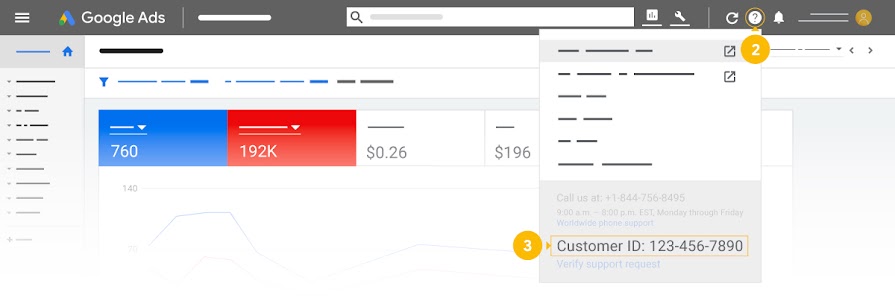
1. Provide Your Customer ID Number

If you have a Google Ads account already, you will need to provide the account number to CyberMark before we begin building out your ad campaigns. Follow the steps below and give the number to your onboarding representative.

  1. Sign in to your Google Ads account.
  2. Click the help icon in the top right corner.
  3. Find “Customer ID” at the bottom of the menu.
Step 2: Approve the request

CyberMark will request access to your account. You should receive an email to approve the request. If not, follow the steps below.

  1. Sign in to your Google Ads manager account.
  2. Click the Tools & settings icon Google Ads | tools [Icon], then under “Setup”, click Access and security.
  3. Select the Managers tab. Under “Link request”, you’ll find a list of manager accounts that have requested to link to your account.
  4. In the “Actions” column, you can Accept or Decline an invitation by pressing the corresponding word. To complete the action, follow the instructions on the page.


  • 22601 N 19th Ave #110 Phoenix, AZ 85027
  • support@cybermark.com

Our Community

  • Home
  • Contact

Helpful Links

  • adVANTAGE
  • localVANTAGE
© 2025 CyberMark. All Rights Reserved.